


Solitaire Word Match
4.9169.00 Reviews
App Specs
- Version
- 1.2.2
- Updated On
- License
- Free
- Downloads
- 100,000+
- Developer
- One Way Street
- Categories
- Word
- Platform
- Android
Screenshots
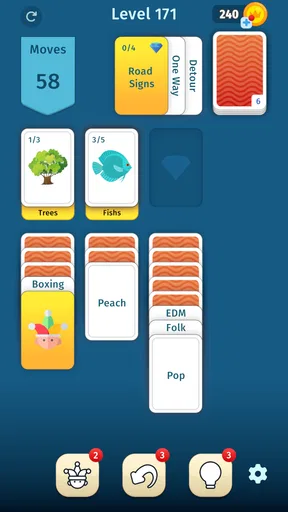
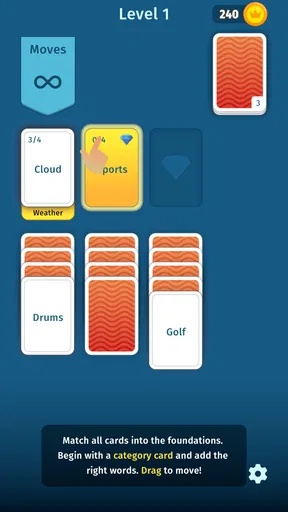
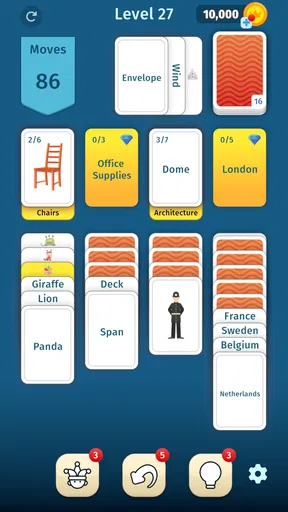
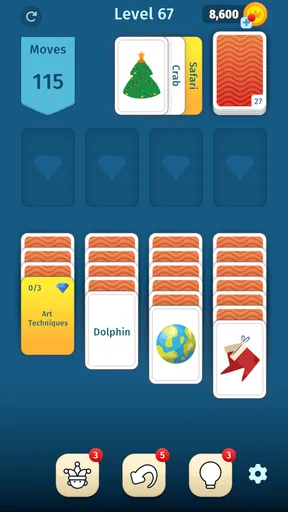
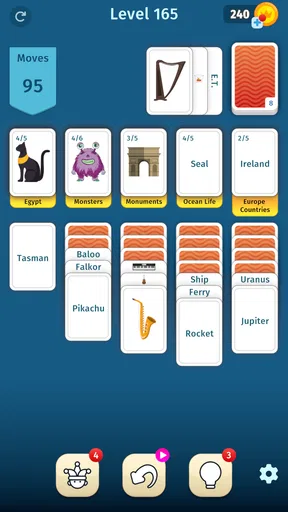
 Analysis by AppCompare
I like the idea behind Solitaire Word Match because it gives a familiar card-game pastime a vocabulary angle. That combination can make a short break feel more engaging than ordinary solitaire without requiring me to settle in for a long gaming session. It is a word game from One Way Street, and I’d consider it most appealing to people who enjoy both arranging cards and looking for words.
What to expect from a quick session
The name sets a clear expectation: this is not just a standard word grid or a straight solitaire clone. The appeal is in switching between card-play habits and word-finding instincts. If you usually play solitaire to relax, the added language challenge gives each turn another decision to consider. If you come from word puzzles, the card framing offers a different kind of structure.
I would approach it as a casual game rather than a dependable vocabulary course. Making words can encourage you to notice letter combinations, but the main purpose is to play and enjoy the puzzle. It suits someone who wants a little mental activity while waiting for an appointment or taking a quiet break, not someone looking for lessons, definitions, or a systematic way to study a language.
A useful way to play is to pause briefly before committing to an obvious short word. I find that scanning the available letters for a less familiar combination can make the word side more satisfying, while still keeping the card decisions in view. The trade-off is that this extra thought can slow a session down; when I only have a minute, I would choose the first workable move rather than turn every hand into a serious puzzle.
Where it fits in a daily routine
Picture a short wait before a bus: I might open the game for a quick round, focus on the letters already in front of me, and stop when the ride arrives. For a calmer evening, I’d give it more attention and treat the word choices as the main challenge. That flexibility is the strongest practical reason to try a hybrid like this instead of keeping separate card and word games for every mood.
It is also worth thinking about what kind of challenge you enjoy. Traditional solitaire is often about planning card sequences and managing what is available; a conventional word puzzle tends to emphasize spelling, vocabulary, or finding words in a fixed arrangement. This game’s identity sits between those familiar options. I’d pick it when I want both kinds of thinking in one session, but choose a dedicated solitaire game if card strategy is all I’m after, or a focused word puzzle if I want a more deliberate language challenge.
That distinction helps set expectations. The combined format is a fresh reason to play, but it may not satisfy someone who wants either side in its deepest form. Players who dislike alternating between visual card choices and word decisions may find the central idea less appealing, even if they normally enjoy one of those genres.
Worth Reading Before You Choose

EA SPORTS FC Mobile 26 Is a Bigger Football Game, but It Takes Time

Flipboard Shows What News Apps Must Do Beyond the Feed

Switching to Android Auto Means Rethinking Your Driving Routine

Google Calendar Makes a Crowded Week Easier to Manage

Ludo King Makes the Most of the Minutes Between Plans

Baby Panda World Brings Quick Play to Modern Phones, but Its Game Library Feels Busy
The Perfect Blend of Cards and Words
Solitaire Word Match is a delightful twist on traditional solitaire, mixing in word puzzles that keep you on your toes. Imagine laying out your cards and, instead of just stacking them in sequence, you’re challenged to create words. It sounds simple, but it’s a refreshing way to get your brain buzzing.
The app’s interface is sleek and intuitive. As soon as you open it, you’re greeted with a clean design that's easy on the eyes. No unnecessary frills, just what you need to jump right into the action. The layout is straightforward, making it accessible whether you’re a tech whiz or someone who struggles with modern gadgets.
Gameplay and Features
When it comes to gameplay, the mechanics are pretty straightforward. You start with a deck of cards, and your goal is to form words from the letters on the cards. The longer the word, the higher your score. There's a satisfying sense of accomplishment every time you manage to create a lengthy word or clear a level.
The app offers various modes to keep things interesting. You can choose to play against the clock in a timed mode, which adds a layer of adrenaline-pumping excitement. If you prefer a more relaxed pace, there’s a zen mode that lets you take your time, perfect for unwinding after a long day.
One of the standout features is the daily challenges. These are special levels that test your skills in unique ways, often with fun themes or specific restrictions. Completing these challenges not only gives you a sense of achievement but also rewards you with in-game bonuses. Who doesn’t love a little extra incentive?
What the format asks of you
The mix has a small but meaningful learning curve: you are weighing the letters you can use while still thinking about the card arrangement. I would not rush to judge a session by its score alone. A longer word can feel rewarding, but taking a sensible move when the available choices are awkward is part of playing well too. When I want a relaxed round, I focus on keeping the choices simple; when I want a more demanding one, I deliberately look for alternative words before making a move.
Timed play and the more leisurely option serve different moods, rather than making one universally better. A clock can make familiar decisions feel tense, which is useful if I want a brisk challenge but less pleasant when I’m trying to switch off. A slower session gives me room to consider letters without pressure. I’d choose between them based on where I am and how much attention I can give the screen, not just on which mode sounds more impressive.
The daily challenges give returning players a reason to vary their routine, especially when a restriction nudges you away from your usual word choices. I’d treat the in-game bonuses as a pleasant extra, not the sole reason to play. If you find yourself checking in only to collect rewards, the routine can start to feel like a chore; the strongest reason to return is still enjoying the card-and-word decisions themselves.
Speed, stability, and playing in short bursts
For a game built around individual choices, perceived speed matters less as a headline number than as a feeling: can I open it, understand the current task, and make a move without turning a brief pause into a setup ritual? The straightforward layout described in play makes the basic interaction approachable. I’d still allow a moment to get oriented when returning after a break, since a hybrid puzzle asks me to look at both letters and card positions rather than simply tap through a familiar sequence.
In heavier moments, such as a timed round or a challenge that makes me search for a better word, the main demand is on attention, not on complicated controls. That is a useful distinction for casual play: a busy commute or a conversation nearby can interrupt concentration even when the game itself feels simple. I would avoid starting a time-sensitive round if I may need to put the phone away immediately. A relaxed session is the more forgiving choice when interruptions are likely.
I prefer games that let me resume my leisure time without making me worry about every interrupted moment. Here, I’d make a practical habit of finishing a move before switching apps or locking the screen, particularly during a timed round. That is not a claim about a special recovery feature; it is simply the safer way to handle any short-session puzzle when I do not want an interruption to affect my focus. If uninterrupted play matters to you, choose a quiet moment and keep the session modest.
As for device demands, a simple-looking word-and-card game seems like a natural fit for ordinary casual play, but I would not treat appearance as proof of how it behaves on every phone. The game is free to download, rated for Everyone, and its listed minimum operating-system requirement is version 7.0. Those details help with basic eligibility, but they do not guarantee identical responsiveness across devices. If your phone is older or already struggles with games, try a short session first and see whether the controls feel comfortable before making it part of your routine.
Who will enjoy it—and who may not
The strongest audience is someone who already likes one of the two ingredients and is curious about the other. A solitaire regular gets a new reason to pay attention to letters, while a word-game fan gets a more spatial, card-based setting for finding them. I’d also recommend trying it if you want a game that can fit around ordinary pauses rather than demand a long, uninterrupted evening.
I would skip it if I wanted a pure test of spelling, a deep traditional solitaire experience, or a game that never asks me to shift how I’m thinking. The hybrid premise is the point, but it is also the main compromise. People who find word puzzles stressful may not enjoy having to form words under a clock, while players who prefer entirely predictable card rules may find the vocabulary element distracting.
Its audience scale suggests that it has found a substantial casual readership: it has over one hundred thousand installs and a 4.9 average from around six thousand ratings. I see that as encouraging context, not a guarantee that every player will love the format. The game is free, with optional in-app purchases priced from $1.99 to $99.99 per item, so I’d start by playing without spending and decide later whether anything offered is genuinely useful to me. The wide range makes it sensible to check the item price carefully before confirming a purchase.
Practical details before you install
The game was released on December 22, 2025, and its current version is 1.2.2. It is listed for Everyone, which makes it broadly suitable from an age-rating standpoint, although I’d still use ordinary care with optional purchases if a child will be playing. Knowing that purchases are available is more useful than assuming “free” means every part of the experience is cost-free.
One question I’d ask before choosing any word game is whether I want solo reflection or competition with other people. The appeal here, as I see it, is the personal challenge of finding words while managing the cards; I wouldn’t choose it specifically for social play. Another practical question is whether a short round can fit my schedule: the presence of both timed and slower play gives me a way to match the mood, but I’d reserve the clock-based option for a moment when I can stay focused.
One Way Street is the developer behind the game. I’d keep the decision to install simple: if the unusual pairing sounds enjoyable, give the free version a try and see whether the turns feel natural on your device. If you already know that you want only classic card play or only a focused word exercise, the more specialized alternative will probably suit you better.
Why It’s Worth Your Time
Now, I know what you might be thinking—"Do I really need another game on my phone?" But hear me out. Solitaire Word Match is worth a spot in your app library. It’s not just about passing the time; it’s about keeping your mind sharp and entertained. This game is perfect for those little pockets of time throughout the day when you need a quick mental escape.
Moreover, the app doesn’t bombard you with ads. That’s a huge win in my book. You can enjoy your game session without constant interruptions, which is a rarity these days. Plus, the developers seem committed to regular updates, so you can look forward to new features and improvements down the line.
My verdict on its performance and appeal
My performance verdict is deliberately practical: I’d judge it by whether the card-and-word combination remains comfortable on my own phone and whether a session fits the time I have, rather than expect every device to behave alike. The available details give a minimum OS requirement, but no universal promise about speed or resource use. A brief trial is the best way to find out if it feels responsive for your setup. For everyday casual play, the clear, uncomplicated presentation is a point in its favor; for a phone that already has trouble with games, I would test before relying on it as a regular time-killer.
The rating is notably positive, but the small gap between a strong average and any individual player’s taste matters here: the central blend is distinctive, and distinctive mechanics are not for everyone. I like that the game can offer both a quick decision-making burst and a slower word search. I’m less convinced it will work for someone who wants a single, consistent kind of puzzle every time they open a game.
There are also two sensible limits to keep in mind. First, a hybrid game cannot replace a dedicated word-learning tool if your goal is structured practice. Second, optional purchases mean I would pay attention to spending rather than treat the free download as a promise that every extra is included. Neither point spoils the core idea, but both help me recommend it to the right person rather than to everyone.
Final Thoughts
In conclusion, Solitaire Word Match is a fantastic choice if you’re looking to spice up your mobile gaming experience. It combines the classic fun of solitaire with the intellectual challenge of word games, creating a unique experience that’s both fun and educational. Whether you’re a word aficionado or a solitaire enthusiast, this app has something to offer.
If you’re ready to give your vocabulary a workout while enjoying the strategic depth of solitaire, this is the app for you. So why not give it a try? I promise, you’ll be hooked in no time!
Pros
- Engaging word puzzles keep your mind active.
- User-friendly interface with smooth navigation.
- Daily challenges add variety and excitement.
- Offline mode available for uninterrupted play.
- Visually appealing with customizable themes.
Cons
- Limited hints can be frustrating for beginners.
- Ads can interrupt gameplay frequently.
- Occasional bugs cause minor crashes.
- In-app purchases needed for advanced features.
- Some puzzles feel repetitive over time.
FAQs for Solitaire Word Match
What is Solitaire Word Match and how does it work?
Solitaire Word Match is a unique blend of classic solitaire card gameplay with word puzzle elements. Players must create words from a randomized set of letters while adhering to traditional solitaire rules. This innovative combination challenges both your strategic thinking and vocabulary skills, making it a perfect choice for puzzle and card game enthusiasts.
Is Solitaire Word Match free to play?
Yes, Solitaire Word Match is free to download and play. However, there may be in-app purchases available, such as hints or additional game modes, to enhance the gaming experience. While these purchases can provide benefits, they are entirely optional and the core game can be enjoyed without spending money.
What are the system requirements for Solitaire Word Match?
Solitaire Word Match is designed to run smoothly on most modern Android and iOS devices. It requires Android version 5.0 or later, or iOS version 11.0 or later. Ensure your device has sufficient storage and RAM to maintain optimal performance during gameplay. Regular updates may adjust these requirements slightly.
Does Solitaire Word Match offer offline gameplay?
Yes, Solitaire Word Match can be played offline, making it convenient for users who want to enjoy the game without an internet connection. However, certain features, such as leaderboard updates and in-app purchases, may require an internet connection to function properly.
Are there any social features in Solitaire Word Match?
Solitaire Word Match includes several social features, such as leaderboards and achievements, allowing players to compete with friends or other users globally. Players can connect via social media or through the app’s built-in friend system to share their scores and progress, fostering a competitive yet friendly community.


